
Rafael Monnerat, Klaus Wölfel, Jingjing XU |
实践:使用ERP5配置器为您的实例进行配置
使用ERP5配置器为中小企业配置ERP5实例
本教程指导您如何运用ERP5配置器为您的公司或组织将要使用的ERP5实例进行配置。通过ERP5配置器,您只需填写与一些与您的公司或组织相关的信息,等待ERP5配置器自动运行后,就可以在短短几分钟之内开始使用ERP5。
标准配置
本配置器旨在为中小企业配置ERP5实例,它包含了最基本的模块功能配置,例如贸易,会计,文件管理等。
ERP5标准配置实例包含了预先定义的类别,模块,安全设置这些中小企业通用的ERP配置广度。该项配置可以使您熟悉如何根据企业需求配置一个ERP。
| setTimeout | 60000 |
|
| deleteCookie | LOCALIZER_LANGUAGE |
|
| createCookie | LOCALIZER_LANGUAGE=en |
|
| openAndWait | ${base_url}/view |
|
| store | ${base_url}/portal_configurator | configurator_base_url |
| openAndWait | ${base_url}/Zuite_setUpConfigurationTest |
|
| verifyTextPresent | Init Ok |
|
Configure your Site(配置您的站点)
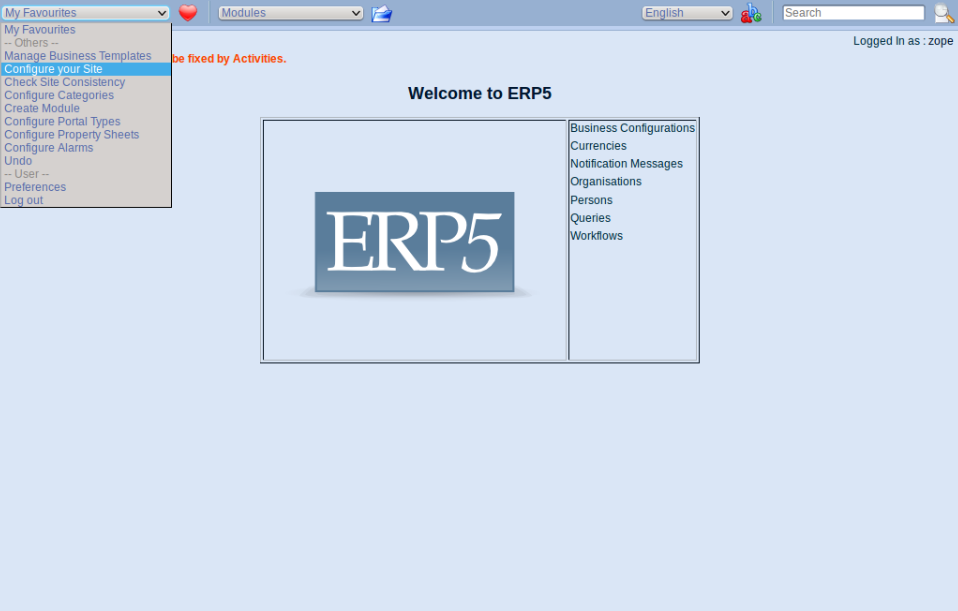
请打开ERP5主页左上方“My favourites(我的菜单)”然后选择“Configure your Site(配置您的站点)”以开始配置您的ERP5站点。然后您会被引导进入Configurator Tool(配置工具)页面。
欢迎来到配置器
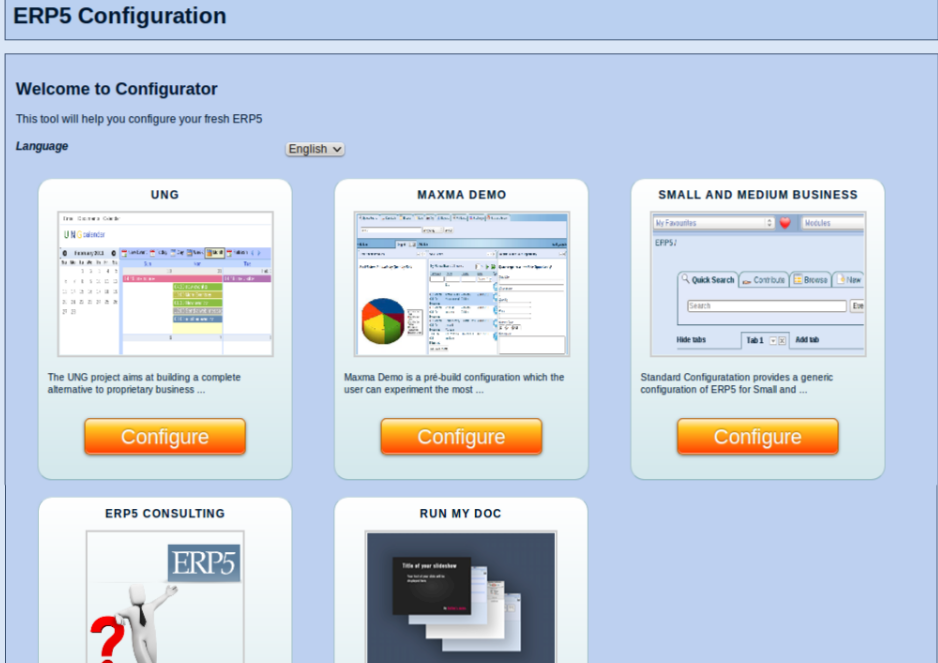
这是配置器的初始页面,您可以选择您需要的配置。本教程我们选择SMALL AND MEDIUM BUSINESS(中小企业)。
| setTimeout | 1200000 |
|
| openAndWait | ${base_url}/Zuite_waitForActivities |
|
| verifyTextPresent | Done. |
|
| setTimeout | 120000 | |
| pause | 4000 |
|
| openAndWait | ${configurator_base_url}/view |
|
| verifyTextPresent | ERP5 Configuration |
|
| verifyTextPresent | Welcome to Configurator |
|
| verifyTextPresent | This tool will help you configure your fresh ERP5 |
|
| verifyTextPresent | Language |
|
| verifyTextPresent | ERP5 Configuration |
|
| clickAndWait | //button[@value='business_configuration_module/STANDARD_CONFIGURATOR_TEST'] |
|
Your Organisation(您的组织)
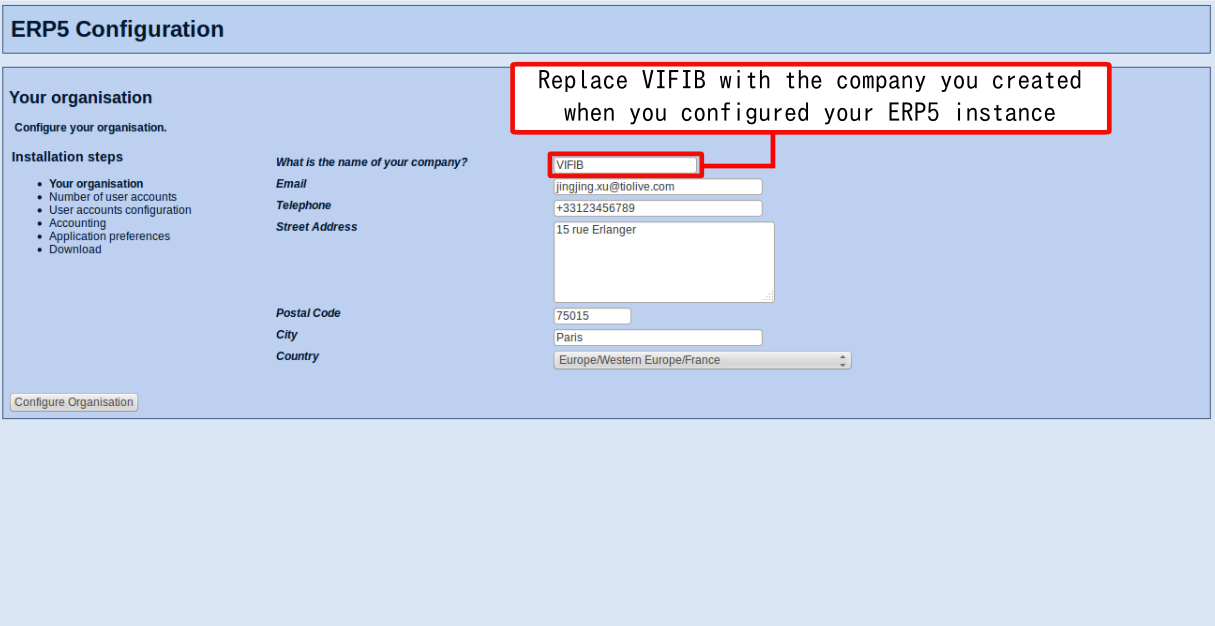
进入“您的组织”页面后,请输入您的公司的相关信息。请务必正确填写配置公司的信息,因为配置结束后,您将无法对这些信息进行更改。完成填写后,请点击"Configure Organisation(配置您的组织)"。
注意:现在您正在为您的公司配置ERP5实例,因此请使用您的公司的信息,例如Name名称,Email邮件,Address地址,Country国家。
| verifyTextPresent | ERP5 Configuration |
|
| verifyTextPresent | Installation steps |
|
| verifyTextPresent | Number of user accounts |
|
| verifyTextPresent | User accounts configuration |
|
| verifyTextPresent | Accounting |
|
| verifyTextPresent | Application preferences |
|
| verifyTextPresent | Download |
|
| verifyTextPresent | Your organisation |
|
| verifyTextPresent | What is the name of your company? |
|
| verifyTextPresent |
|
|
| verifyTextPresent | Telephone |
|
| verifyTextPresent | Street Address |
|
| verifyTextPresent | Postal Code |
|
| verifyTextPresent | City |
|
| verifyTextPresent | Country |
|
| verifyElementPresent | //input[@name="next:method"] |
|
| verifyValue | //input[@name="next:method"] | Configure Organisation |
| type | //input[@name="field_your_title"] | Nexedi SA |
| type | //input[@name="field_your_default_email_text"] | webproject-report@erp5.org |
| type | //input[@name="field_your_default_telephone_text"] | +123 234 567 891 |
| type | //textarea[@name="field_your_default_address_street_address"] | 270 bd Clémenceau, 59700 Marcq-en-Baroeul |
| type | //input[@name="field_your_default_address_zip_code"] | 59700 |
| select | //select[@name="field_your_default_address_region"] | Europe/Western Europe/France |
| clickAndWait | //input[@name="next:method"] |
|
| verifyTextPresent | Input is required but no input given. |
|
| verifyValue | //input[@name="field_your_title"] | Nexedi SA |
| verifyValue | //input[@name="field_your_default_email_text"] | webproject-report@erp5.org |
| verifyValue | //input[@name="field_your_default_telephone_text"] | +123 234 567 891 |
| verifyValue | //textarea[@name="field_your_default_address_street_address"] | 270 bd Clémenceau, 59700 Marcq-en-Baroeul |
| verifyValue | //input[@name="field_your_default_address_zip_code"] | 59700 |
| verifyValue | //select[@name="field_your_default_address_region"] | europe/western_europe/france |
| type | //input[@name="field_your_default_address_city"] | Lille |
| clickAndWait | //input[@name="next:method"] |
|
Number of user accounts(用户账户数目)
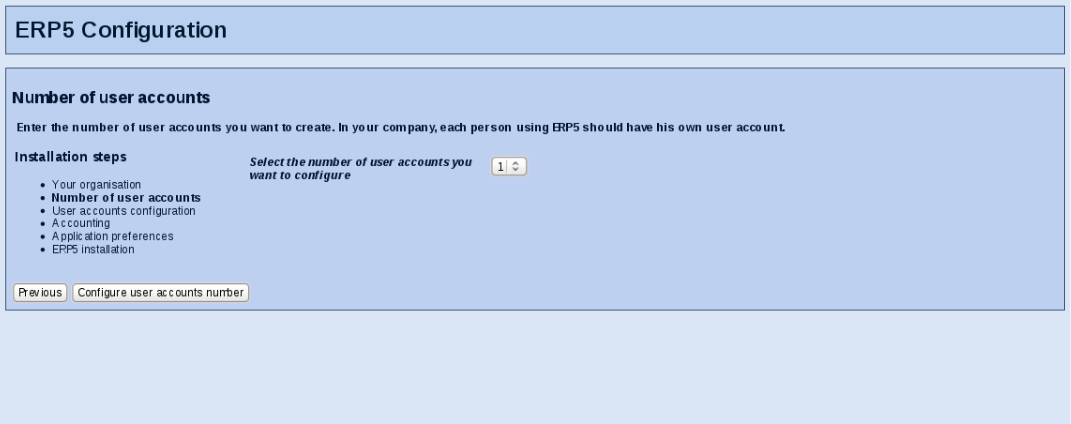
现在您需要选择您在配置过程中需要为组织建立的用户数目。您也可以在配置结束后在您的ERP5实例中添加用户账户,因此在这里您不需要为您的组织的全部系统用户进行配置。完成后请点击"Configure user accounts number配置用户账户数目"。
| verifyTextPresent | ERP5 Configuration |
|
| verifyTextPresent | Installation steps |
|
| verifyTextPresent | Number of user accounts |
|
| verifyTextPresent | User accounts configuration |
|
| verifyTextPresent | Accounting |
|
| verifyTextPresent | Application preferences |
|
| verifyTextPresent | Download |
|
| verifyTextPresent | Number of user accounts |
|
| verifyTextPresent | Enter the number of user accounts you want to create. In your company, each person using ERP5 should have his own user account. |
|
| verifyTextPresent | Select the number of user accounts you want to configure |
|
| verifyElementPresent | //input[@name="next:method"] |
|
| verifyValue | //input[@name="next:method"] | Configure user accounts number |
| verifyValue | //input[@name="previous:method"] | Previous |
| verifyElementPresent | //input[@name="previous:method"] |
|
| clickAndWait | //input[@name="previous:method"] |
|
| verifyTextPresent | ERP5 Configuration |
|
| verifyTextPresent | Installation steps |
|
| verifyTextPresent | Number of user accounts |
|
| verifyTextPresent | User accounts configuration |
|
| verifyTextPresent | Accounting |
|
| verifyTextPresent | Application preferences |
|
| verifyTextPresent | Download |
|
| verifyTextPresent | Your organisation |
|
| verifyTextPresent | What is the name of your company? |
|
| verifyTextPresent |
|
|
| verifyTextPresent | Telephone |
|
| verifyTextPresent | Street Address |
|
| verifyTextPresent | Postal Code |
|
| verifyTextPresent | City |
|
| verifyTextPresent | Country |
|
| verifyElementPresent | //input[@name="next:method"] |
|
| verifyValue | //input[@name="next:method"] | Configure Organisation |
| verifyValue | //input[@name="field_your_title"] | Nexedi SA |
| verifyValue | //input[@name="field_your_default_email_text"] | webproject-report@erp5.org |
| verifyValue | //input[@name="field_your_default_telephone_text"] | +123 234 567 891 |
| verifyValue | //textarea[@name="field_your_default_address_street_address"] | 270 bd Clémenceau, 59700 Marcq-en-Baroeul |
| verifyValue | //input[@name="field_your_default_address_zip_code"] | 59700 |
| verifyValue | //select[@name="field_your_default_address_region"] | europe/western_europe/france |
| verifyValue | //input[@name="field_your_default_address_city"] | Lille |
| clickAndWait | //input[@name="next:method"] |
|
| verifyTextPresent | ERP5 Configuration |
|
| verifyTextPresent | Installation steps |
|
| verifyTextPresent | Number of user accounts |
|
| verifyTextPresent | User accounts configuration |
|
| verifyTextPresent | Accounting |
|
| verifyTextPresent | Application preferences |
|
| verifyTextPresent | Download |
|
| verifyTextPresent | Number of user accounts |
|
| verifyTextPresent | Enter the number of user accounts you want to create. In your company, each person using ERP5 should have his own user account. |
|
| verifyTextPresent | Select the number of user accounts you want to configure |
|
| verifyElementPresent | //input[@name="next:method"] |
|
| verifyValue | //input[@name="next:method"] | Configure user accounts number |
| verifyValue | //input[@name="previous:method"] | Previous |
| verifyElementPresent | //input[@name="previous:method"] |
|
| select | //select[@name="field_your_company_employees_number"] | 1 |
| clickAndWait | //input[@name="next:method"] |
|
User accounts configuration(配置用户账户)
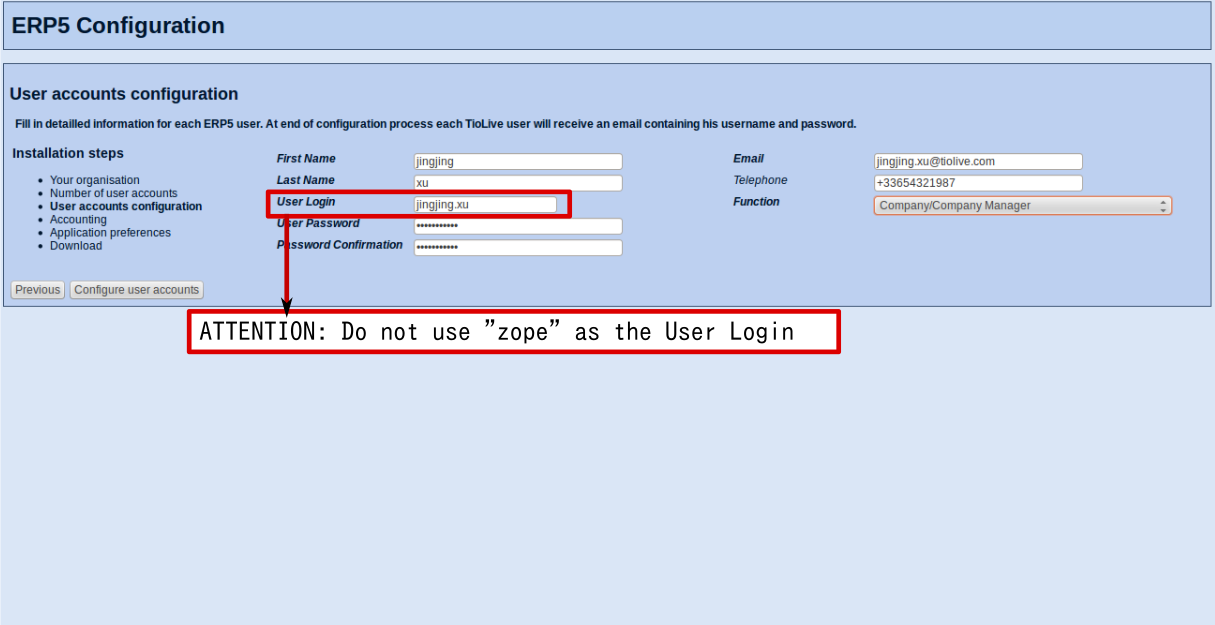
接下来您就需要为您选择创建的用户账户一一填写信息。注意:请勿使用“zope”作为用户名。
一旦您定义了用户信息,这些用户就会通过您输入的邮件地址收到他们登入您的ERP5系统的登入名和密码。完成设置后,请点击"Configure user accounts(配置用户账户)"。
| verifyTextPresent | ERP5 Configuration |
|
| verifyTextPresent | Installation steps |
|
| verifyTextPresent | Number of user accounts |
|
| verifyTextPresent | User accounts configuration |
|
| verifyTextPresent | Accounting |
|
| verifyTextPresent | Application preferences |
|
| verifyTextPresent | Download |
|
| verifyTextPresent | User accounts configuration |
|
| verifyTextPresent | Fill in detailled information for each ERP5 user. |
|
| verifyTextPresent | User accounts configuration |
|
| verifyTextPresent | Fill in detailled information for each ERP5 user. |
|
| verifyTextPresent | First Name |
|
| verifyTextPresent | Last Name |
|
| verifyTextPresent | User Login |
|
| verifyTextPresent | User Password |
|
| verifyTextPresent | Password Confirmation |
|
| verifyTextPresent | Function |
|
| verifyElementPresent | //input[@name="next:method"] |
|
| verifyValue | //input[@name="next:method"] | Configure user accounts |
| verifyValue | //input[@name="previous:method"] | Previous |
| verifyElementPresent | //input[@name="previous:method"] |
|
| type | //input[@name="field_your_first_name"] | Ivan |
| type | //input[@name="field_your_last_name"] | Petrov |
| type | //input[@name="field_your_reference"] | PERSON_RESERVED_REFERENCE |
| type | //input[@name="field_your_password"] | secret |
| type | //input[@name="field_your_password_confirm"] | secret |
| select | //select[@name="field_your_function"] | Company/Company Manager |
| type | //input[@name="field_your_default_email_text"] | webproject-report@erp5.org |
| clickAndWait | //input[@name="next:method"] |
|
| verifyTextPresent | User login is either already used or contains invalid characters |
|
| verifyTextPresent | Please try another one |
|
| type | //input[@name="field_your_reference"] | PERSON_USER_REFERENCE |
| clickAndWait | //input[@name="next:method"] |
|
Accounting(会计)
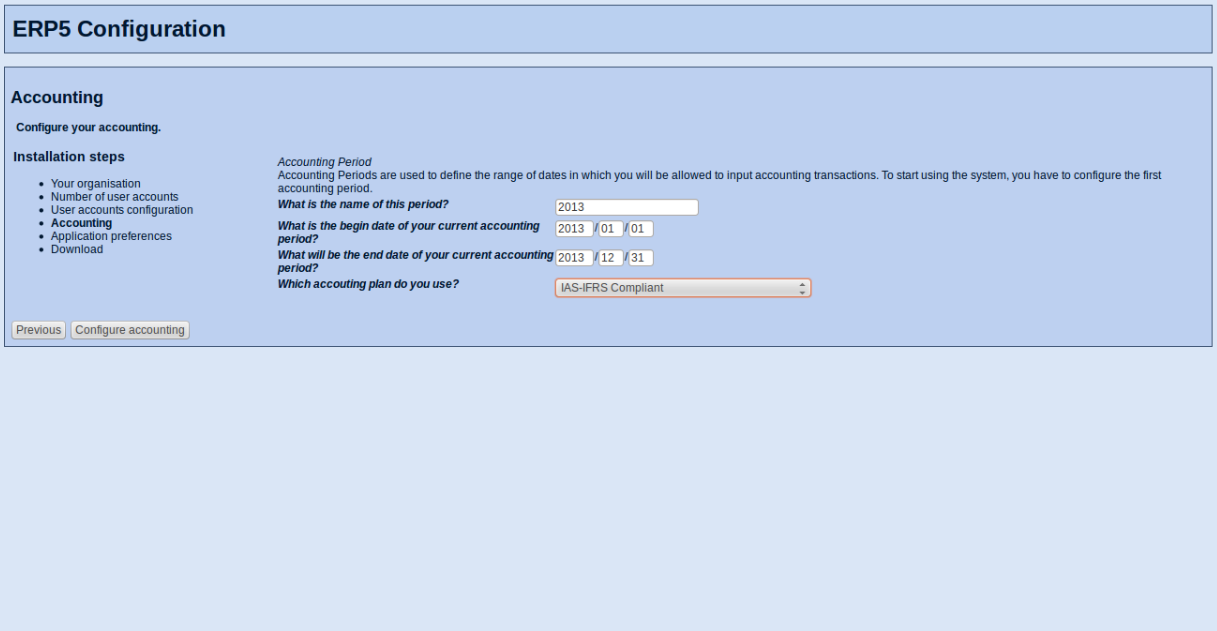
现在请选择您的组织需要使用的会计科目表(如果您需要的会计科目表不再选项中,请联系我们以指导您如何在ERP5中导入您需要的会计科目表)。然后您需要定义该会计期间的名称,开始和结束日期。完成设置后请点击"Configure accounting(配置会计)"。
| verifyTextPresent | ERP5 Configuration |
|
| verifyTextPresent | Installation steps |
|
| verifyTextPresent | Number of user accounts |
|
| verifyTextPresent | User accounts configuration |
|
| verifyTextPresent | Accounting |
|
| verifyTextPresent | Application preferences |
|
| verifyTextPresent | Download |
|
| verifyTextPresent | Accounting |
|
| verifyTextPresent | Configure your accounting. |
|
| verifyTextPresent | Which accouting plan do you use? |
|
| verifyTextPresent | Accounting Period |
|
| verifyTextPresent | Accounting Periods are used to define the range of dates in which you will be allowed to input accounting transactions. |
|
| verifyTextPresent | To start using the system, you have to configure the first accounting period. |
|
| verifyTextPresent | What is the begin date of your current accounting period? |
|
| verifyTextPresent | What will be the end date of your current accounting period? |
|
| verifyTextPresent | What is the name of this period? |
|
| verifyElementPresent | //input[@name="next:method"] |
|
| verifyValue | //input[@name="next:method"] | Configure accounting |
| verifyValue | //input[@name="previous:method"] | Previous |
| verifyElementPresent | //input[@name="previous:method"] |
|
| verifyValue | //input[@name="subfield_field_your_period_start_date_year"] | 2012 |
| verifyValue | //input[@name="subfield_field_your_period_start_date_month"] | 01 |
| verifyValue | //input[@name="subfield_field_your_period_start_date_day"] | 01 |
| verifyValue | //input[@name="subfield_field_your_period_stop_date_year"] | 2012 |
| verifyValue | //input[@name="subfield_field_your_period_stop_date_month"] | 12 |
| verifyValue | //input[@name="subfield_field_your_period_stop_date_day"] | 31 |
| verifyValue | //input[@name="field_your_period_title"] | 2012 |
| clickAndWait | //input[@name="next:method"] |
|
Application Preferences(应用偏好)
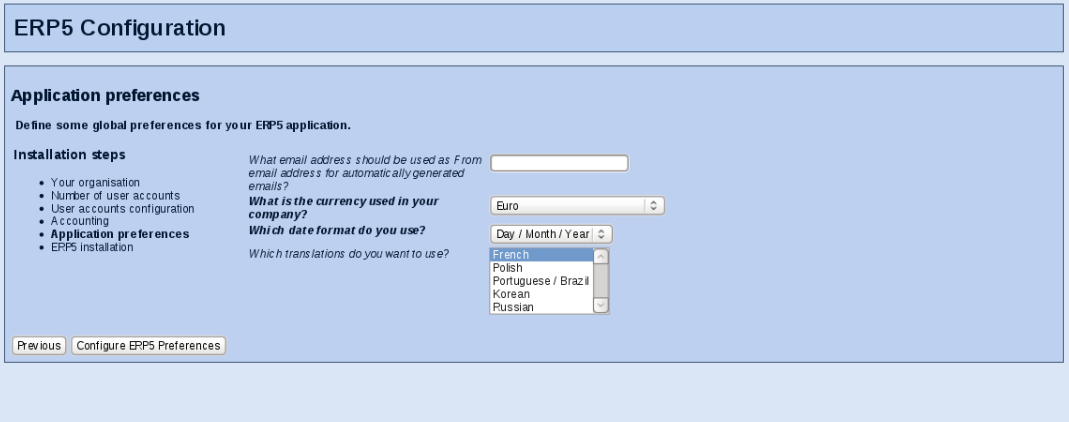
在本页配置中,您需要为您的账户选择“From(发自)”邮件地址,该邮件地址将被自动设置为您使用ERP5系统发出邮件的“From(发自)”邮件地址。您还需要选择默认会计货币以及您的系统需要的语言。英语是默认语言,其他语言需要通过配置过程进行安装。完成设置后,请点击"Configure ERP5 Preferences(配置ERP5偏好)"。
| verifyTextPresent | ERP5 Configuration |
|
| verifyTextPresent | Installation steps |
|
| verifyTextPresent | Number of user accounts |
|
| verifyTextPresent | User accounts configuration |
|
| verifyTextPresent | Accounting |
|
| verifyTextPresent | Application preferences |
|
| verifyTextPresent | Download |
|
| verifyTextPresent | Application preferences |
|
| verifyTextPresent | Define some global preferences for your ERP5 application. |
|
| verifyTextPresent | What email address should be used as From email address for automatically generated emails? |
|
| verifyTextPresent | What is the currency used in your company? |
|
| verifyTextPresent | Which date format do you use? |
|
| verifyTextPresent | Which translations do you want to use? |
|
| verifyElementPresent | //input[@name="next:method"] |
|
| verifyValue | //input[@name="next:method"] | Configure ERP5 Preferences |
| verifyValue | //input[@name="previous:method"] | Previous |
| verifyElementPresent | //input[@name="previous:method"] |
|
| select | //select[@name="field_your_price_currency"] | Euro |
| select | //select[@name="field_your_preferred_date_order"] | Day / Month / Year |
| addSelection | //select[@name="field_your_lang"] | label=French |
| clickAndWait | //input[@name="next:method"] |
|
总结
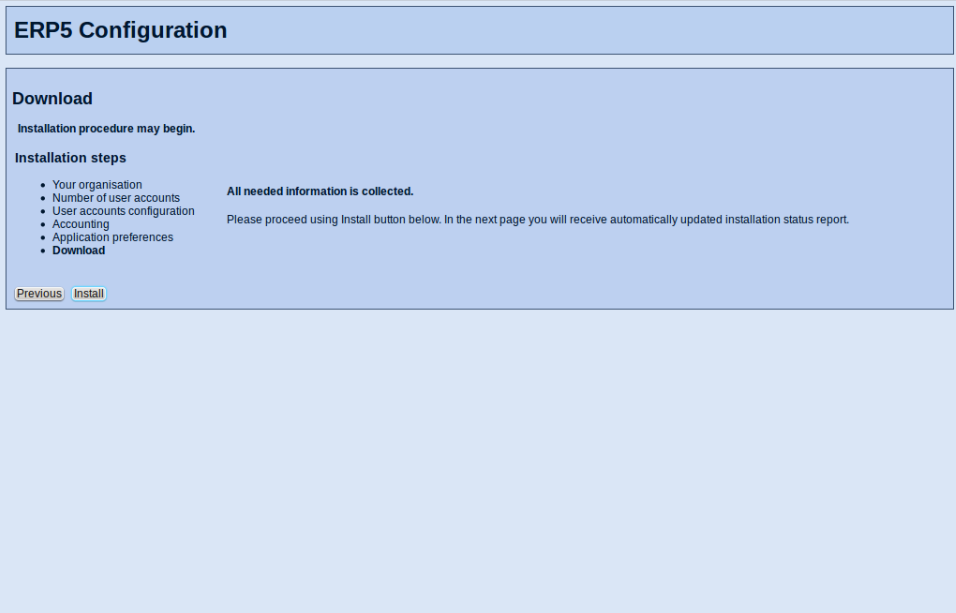
设置结束后,您会看到该页面,这就告诉您系统已经收集了安装所需的信息。现在您还可以返回前面的步骤对已填写信息进行更改,一旦您点击“Install(安装)”,您就无法再对配置信息进行更改了。当您确认设置正确后,请点击“Install(安装)”。
| verifyTextPresent | ERP5 Configuration |
|
| verifyTextPresent | Installation steps |
|
| verifyTextPresent | Number of user accounts |
|
| verifyTextPresent | User accounts configuration |
|
| verifyTextPresent | Accounting |
|
| verifyTextPresent | Application preferences |
|
| verifyTextPresent | Download |
|
| verifyTextPresent | Download |
|
| verifyTextPresent | Installation procedure may begin |
|
| verifyTextPresent | You are going to install your selected configuration. |
|
| verifyTextPresent | Please proceed using Install button below. |
|
| verifyTextPresent | In the next page you will receive automatically updated installation status report. |
|
| verifyElementPresent | //input[@name="next:method"] |
|
| verifyValue | //input[@name="next:method"] | Install |
| verifyValue | //input[@name="previous:method"] | Previous |
| verifyElementPresent | //input[@name="previous:method"] |
|
| clickAndWait | //input[@name="next:method"] |
|
安装
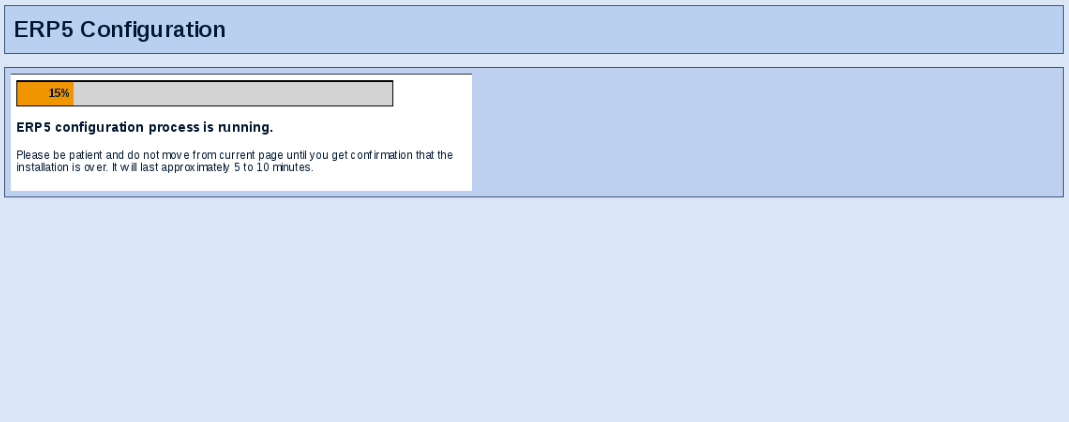
通过安装进程条,您可以查看您的ERP5的安装进程。即使您离开页面,安装进程也会继续。安装结束后,您会看到进程条下方一个链接引导您登入您的ERP5实例。如果您看到"Error code 500"的字样,请不要担心,这说明您的ERP5需要更长时间完成安装。等候片刻后,请通过"My Favourites(我的菜单)"中"Log out(注销)"退出错误信息页面。然后您就可以使用您在配置过程中设置的用户名和密码登入您的EP5系统了。
| waitForCondition | selenium.isTextPresent("ERP5 configuration process is running.") | 10000 |
| verifyTextPresent | Please be patient and do not move from current page until you get |
|
| verifyTextPresent | confirmation that the installation is over. |
|
| verifyTextPresent | It will last approximately 5 to 10 minutes. |
|
| setTimeout | 1200000 |
|
| openAndWait | ${base_url}/Zuite_waitForActivities |
|
| verifyTextPresent | Done. |
|
| setTimeout | 30000 |
|
| openAndWait | ${base_url}/Zuite_assertEndConfiguration |
|
| verifyTextPresent | True |
|
| openAndWait | ${base_url}/view | |
| verifyTextPresent | ${base_user} | |
| openAndWait | ${base_url}/logout | |
| openAndWait | ${base_url}/login_form | |
| type | //input[@name="__ac_name"] | PERSON_USER_REFERENCE |
| type | //input[@name="__ac_password"] | secret |
| clickAndWait | //input[@name="logged_in:method"] | |
| openAndWait | ${base_url}/view | |
| verifyTextPresent | PERSON_USER_REFERENCE | |
| openAndWait | ${base_url}/Zuite_waitForActivities | |
| verifyTextPresent | Done. | |
| setTimeout | 30000 | |
| openAndWait | ${base_url}/login_form | |
| type | //input[@name="__ac_name"] | ${base_user} |
| type | //input[@name="__ac_password"] | |
| clickAndWait | //input[@name="logged_in:method"] |
"Start using your new ERP5 system"(开始使用您的ERP5系统)
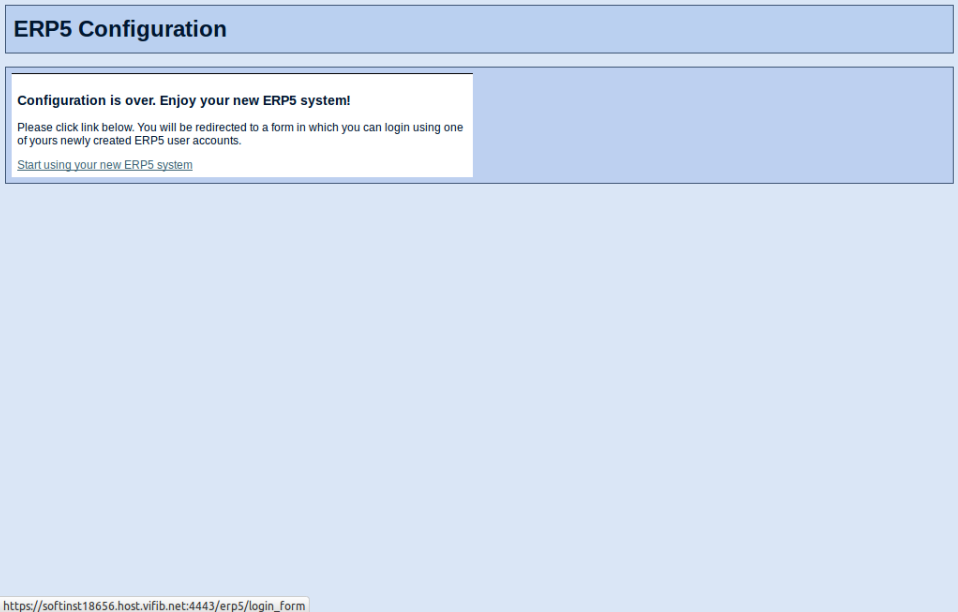
一旦您看见如图所示链接"Start using your new ERP5 system(开始使用您的ERP5系统)",您就可以点击该链接进入您配置的ERP5。
Log In(登入)
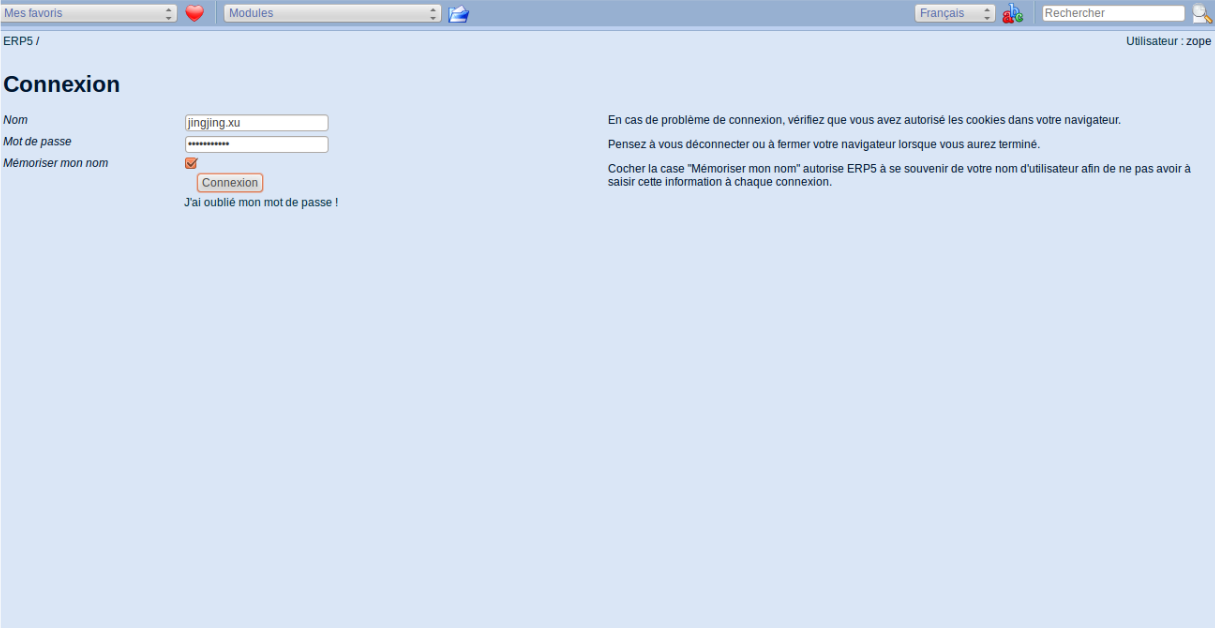
现在您就可以使用您在配置过程中为您的用户账户设置的Name(用户名)和Password(密码)来登入并使用您的ERP5系统了。
Thank You
- Nexedi SA
- 147 Rue du Ballon
- 59110 La Madeleine
- France
- +33629024425
For more information, please contact Jean-Paul, CEO of Nexedi (+33 629 02 44 25).